

The decentralized web represents a paradigm shift in how we think about and interact with the internet. Moving away from centralized servers and gatekeepers, the decentralized web offers a vision of a more open, secure, and user-centric online experience.
In this landscape, tools like Fleek are pioneering the way developers approach web app development. In this article, we’ll delve into the world of Fleek, explore the nuances of deploying on IPFS and ICP, and provide hands-on tutorials for each.
What is Fleek?
Definition and Main Features
Fleek is an all-in-one platform designed to streamline the process of building on the decentralized web. With its suite of tools and services, developers can:
- Deploy websites and apps on IPFS with ease.
- Integrate seamlessly with blockchain technologies.
- Leverage the power of the Internet Computer Protocol (ICP).
Benefits of Using Fleek
Using Fleek offers several advantages for developers:
- Simplicity: No need to manage complex infrastructure or configurations.
- Decentralization: Host your apps on a network that’s resistant to censorship and outages.
- Integration: Fleek is designed to work harmoniously with other web3 technologies, making it a versatile choice for diverse projects.
Dive into IPFS
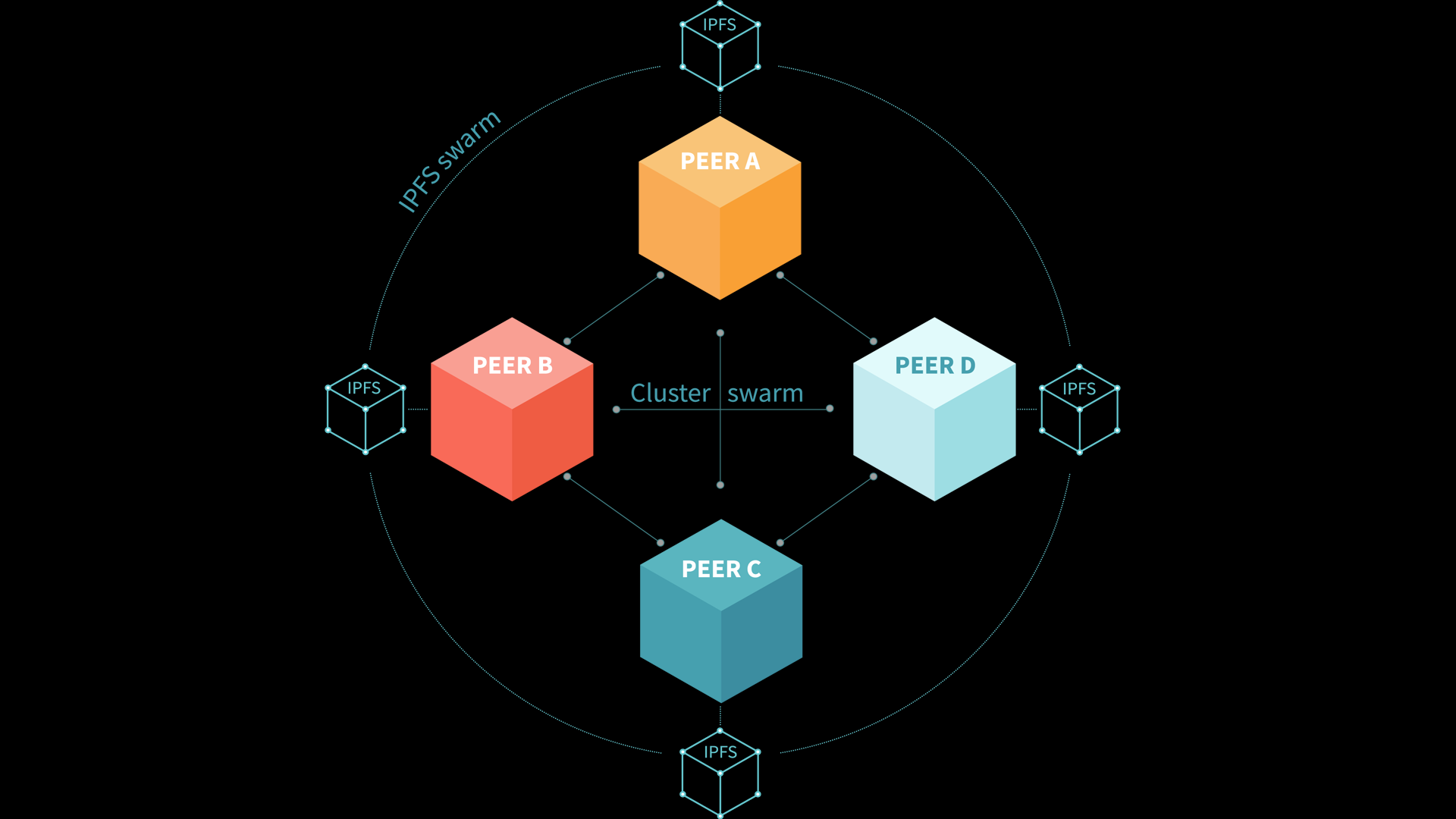
IPFS, or the InterPlanetary File System, is a revolutionary peer-to-peer network designed to make the web faster, safer, and more open.
Unlike traditional web hosting methods that rely on centralized servers, IPFS uses content-addressing to locate and retrieve data, ensuring that content remains accessible even if parts of the network go down.
Understanding ICP (Internet Computer Protocol)
The Internet Computer Protocol (ICP) represents a bold vision for the future of the internet. Developed by DFINITY, ICP aims to extend the functionality of the public internet, transforming it into a global computing platform.
Features of ICP
- Decentralized Architecture: ICP operates on a network of independent data centers, ensuring resilience and reducing the risks associated with centralized systems.
- Chain Key Technology: This unique technology allows the Internet Computer to operate at web speed, despite being a blockchain-based system.
- Seamless Integration: Developers can build open internet services, pan-industry platforms, and even enterprise systems using ICP.
Benefits of Building on ICP
- Security: The decentralized nature of ICP ensures that applications are secure from hacks and breaches.
- Scalability: ICP is designed to scale out its capacity with user demand, ensuring consistent performance.
- Sovereign Identity: Users can interact with applications on the Internet Computer without intermediaries, ensuring data privacy and integrity.
Comparing IPFS and ICP with Fleek
When it comes to deploying web apps with Fleek, both IPFS and ICP offer unique advantages.
However, the choice between the two often boils down to the specific requirements of the project.
Deploying on IPFS
- Decentralization: IPFS offers a truly decentralized hosting solution, ensuring content remains accessible.
- Content Addressing: IPFS uses hashes to retrieve content, ensuring data integrity.
- Integration with Fleek: Fleek provides a seamless experience for deploying apps on IPFS, with features like continuous deployment from Git.
Deploying on ICP
- Extended Functionality: ICP goes beyond hosting, offering a platform for building a new generation of open internet services.
- Speed and Efficiency: Despite being blockchain-based, ICP operates at web speeds, thanks to its chain key technology.
- Integration with Fleek: While Fleek’s primary integration is with IPFS, it also offers tools and services compatible with ICP.
Tutorial: Building a Basic Web App with Fleek on IPFS
Deploying a web app on IPFS using Fleek is a straightforward process. Here’s a step-by-step guide to get you started:
Setting Up a New Project on Fleek
- Sign Up/Log In: Head over to Fleek’s official website and sign up or log in using your preferred method.
- Create a New Site: Once logged in, navigate to the dashboard and click on “Add New” to start a new project.
- Connect Your Repository: Link your GitHub, GitLab, or Bitbucket repository where your web app’s code resides.
Deploying to IPFS
- Choose a Build Environment: Fleek supports various frameworks. Select the one that matches your project.
- Configure Build Settings: Specify the build command and the publish directory. For example, for a React app, you might use npm run build as the build command and build/ as the publish directory.
- Deploy: Click on the “Deploy” button. Fleek will now build and deploy your site to IPFS.
- Access Your Site: Once the deployment is complete, Fleek will provide you with an IPFS link to access your web app.
Ensuring App Accessibility and Performance
- Use Fleek’s Edge Network: This ensures that your site loads quickly from any location.
- Set Up a Custom Domain: Fleek allows you to link a custom domain to your IPFS-deployed site, providing a more professional look.
- Enable HTTPS: For added security, ensure that your site is served over HTTPS. Fleek provides automatic HTTPS for all sites.
Tutorial: Building a Basic Web App with Fleek on ICP
Deploying on ICP using Fleek requires a slightly different approach, given the unique architecture of the Internet Computer.
Here’s how you can do it:
Setting Up a New Project for ICP Deployment
- ICP Preparation: Before deploying on ICP, ensure you have the necessary canister IDs and are familiar with the DFINITY SDK.
- Fleek Setup: As with IPFS, start by creating a new site on Fleek and connecting your repository.
Deploying to ICP
- Specify Environment: Choose the ICP environment in Fleek’s deployment settings.
- Provide Canister Information: Input the necessary canister IDs and other relevant details.
- Deploy: Initiate the deployment process. Fleek will handle the rest, ensuring your app is live on the Internet Computer.
Managing and Updating Your App on ICP
- Monitoring: Use Fleek’s dashboard to monitor the status and health of your ICP deployment.
- Updates: Whenever you push changes to your linked repository, Fleek can automatically build and deploy the updates to ICP.
- Backup and Redundancy: Given ICP’s decentralized nature, your app benefits from inherent redundancy. However, always maintain backups of your code and data.
Best Practices and Tips
Deploying web apps on decentralized platforms like IPFS and ICP offers numerous advantages, but it also comes with its own set of challenges.
Stay Updated: Decentralized technology is rapidly evolving. Stay updated with the latest developments in IPFS, ICP, and Fleek to leverage new features and improvements.
Follow Dfinity on Twitter to get latest update
Optimizing for Decentralized Platforms
- Minimize Dependencies: Reduce reliance on external libraries and APIs that might not be available or performant on decentralized networks.
- Static Assets: Whenever possible, use static assets. They load faster and are more


